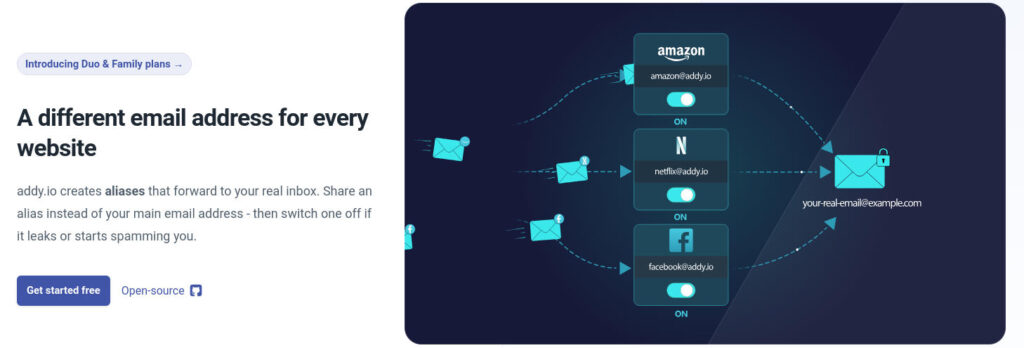
So, I heard about Addy.io last week through Techlore and decided to test it. Sometimes you just stumble onto tools that make you wonder how you managed without them.
The setup took maybe 20 minutes. Now I have multiple email aliases for different purposes, none of them traceable to my real email, and I can kill any alias that starts getting spam without affecting the others.
- Service: Addy.io (https://addy.io/)
- Found via: Techlore’s privacy tools
- Cost: Free tier (unlimited aliases, 10 active at a time, 1 receiver)
- Setup time: ~20 minutes
The Basic Idea
Instead of giving websites your real email address, you give them an alias. The alias forwards to your actual inbox, but the website never sees your real address.
If an alias starts getting spam? Disable it. Create a new one. Done.
No unsubscribing, no filters, no clutter. Just kill the alias and move on.
What I Set Up
I created an anonymous receiver email on my own webhost first, nothing with my name, just a generic forwarding address. Then I signed up for Addy.io and pointed it to that address.
Now Addy.io doesn’t have my personal email. The websites I sign up for don’t have my real email. There’s a layer of separation between my actual identity and every service I use.
My aliases:
- newsletters (for blog subscriptions)
- registrations (general signups, forums)
- shopping (online stores)
- hosting (domain registrars, hosting providers)
- admin (government services, official stuff)
Five aliases, five different purposes. Free tier lets you have 10 active at once, which covers most use cases.
Why This Matters
Every time you use your real email for a random website, you’re creating a permanent link to your identity. Even if the service promises not to share data, breaches happen. Companies get sold. Privacy policies change.
Alias examples:
- Websites can’t sell your real email (they don’t have it)
- Spam gets contained to specific aliases
- You can trace which service leaked your data (if
shoppingalias starts getting spam, you know where it came from) - No single service has the complete picture of your online activity
Info from Addy.io’s site
Key things:
- Free tier: unlimited standard aliases, 10 active at a time, 1 receiver email
- Open-source (you can audit the code)
- Browser extensions for Firefox, Chrome, Edge, Safari, Brave, Vivaldi
- Mobile apps for iOS and Android
- Supports custom domains on paid plans
- GPG encryption option, if you want end-to-end encrypted forwarding
And here’s Techlore’s tools page where I found it:
Techlore maintains a curated list of privacy-focused tools across different categories, browsers, VPNs, email services, password managers, etc. They actually test these services rather than just listing random recommendations. That’s how I found Addy.io in the first place.
Pricing Breakdown
From the Addy.io site:
Free: $0/month
- Unlimited standard aliases
- 10 active shared domain aliases
- 1 recipient email address
- 2 available alias domains
- 10MB monthly bandwidth limit
Lite: $1/month
- 50 active shared domain aliases
- 5 recipients
- 6 available alias domains
- 100MB bandwidth
Pro: $3/month
- Unlimited active aliases
- 30 recipients
- 7 available alias domains
- Custom domains (20)
- 200MB bandwidth
For most people, free tier is enough. I’m on free, and 10 active aliases covers everything I need.
What I Like About This Setup
Separation of concerns: Each alias has a purpose. If newsletters gets spammy, I don’t lose access to my shopping accounts or hosting services. I just kill that one alias.
No personal info to Addy.io: Because I use a self-hosted anonymous receiver email, Addy.io doesn’t have my Gmail, ProtonMail, or any email that could be linked to my identity. They just forward to an address I control.
Open-source: Addy.io’s code is public. You can audit what they’re doing. Not perfect, they still operate the service, but better than closed-source alternatives.
Browser extension: They have extensions for all major browsers. Creates aliases on the fly while you’re signing up for things. I haven’t tested it yet, but it’s on the list.
Trade-offs
This isn’t a perfect privacy solution, and I’m not presenting it as one.
What to keep in mind:
- Addy.io still sees metadata (which aliases are active, when emails arrive)
- You’re trusting Addy.io as a company (they could theoretically log data)
- Doesn’t protect against other tracking (cookies, fingerprinting, etc.)
- If Addy.io shuts down, you lose access to aliases (though you can export them)
Important: Don’t use for critical accounts
I wouldn’t recommend using Addy.io aliases for anything that requires email verification for account recovery, banking, primary Google/Apple accounts, government services, that sort of thing.
If Addy.io goes bankrupt or shuts down unexpectedly, you could lose access to any accounts tied to those aliases. Yes, you can export your aliases. Yes, they’re open-source. But in a sudden shutdown scenario, there might not be time to migrate everything.
My approach: Use aliases for newsletters, shopping, forums, random signups. For critical accounts? Either use your real email directly or a more permanent solution (self-hosted domain you control, or a stable provider like ProtonMail).
The honest take: This is one layer in a broader privacy strategy. It protects your email address specifically. Combine it with other practices: privacy-focused browsers, VPN, minimal data sharing.
Conclusion
Addy.io is a cool find. It’s one of those tools that seems obvious once you’re using it: why would I give every website my real email address?
The free tier covers most use cases. Setup takes 20 minutes. And if nothing else, it’s satisfying to kill an alias that starts getting spam instead of drowning in unsubscribe emails.
What do you think? Do you use email aliases, or do you just deal with spam like the rest of us?
Have you checked out Techlore’s tool recommendations before?